#include
void main()
{
int i,j;
clrscr();
for(i=1;1<=5;i++)
{
for(j=1;j<=i;j++)
{
printf("%d\t",j);
}
printf("\n");
}
getch();
}
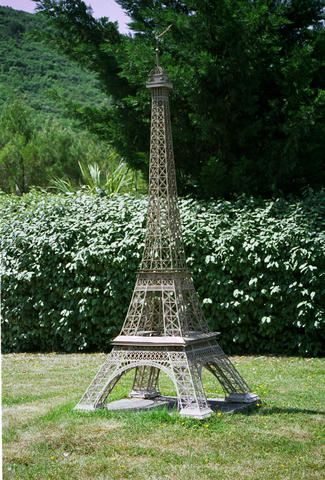
Scale model of the Eiffel tower in Parc Mini-France
HTML doesn't have an element that allows to insert a figure with a caption. It was once proposed (see HTML3), but never made it into HTML4. Here is one way to simulate such a figure element:
    height="200" alt="Eiffel tower" />
 Scale model of the
   Eiffel tower in Parc Mini-France
Then in the style sheet you use the class "figure" to format the figure the way you want. For example, to float the figure to the right, in a space equal to 25% of the width of the surrounding paragraphs, these rules will do the trick:
div.figure {
 float: right;
 width: 25%;
 border: thin silver solid;
 margin: 0.5em;
 padding: 0.5em;
}
div.figure p {
 text-align: center;
 font-style: italic;
 font-size: smaller;
 text-indent: 0;
}
In fact, only the first two declarations (float and width) are essential, the rest is just for decoration.
| CTRL + A | Select all text on a webpage |
| CTRL + B | Open the Bookmarks sidebar |
| CTRL + C | Copy the selected text to the Windows clipboard |
| CTRL + D | Bookmark the current webpage |
| CTRL + F | Find text within the current webpage |
| CTRL + G | Find more text within the same webpage |
| CTRL + H | Opens the webpage History sidebar |
| CTRL + I | Open the Bookmarks sidebar |
| CTRL + J | Opens the Download Dialogue Box |
| CTRL + K | Places the cursor in the Web Search box ready to type your search |
| CTRL + L | Places the cursor into the URL box ready to type a website address |
| CTRL + M | Opens your mail program (if you have one) to create a new email message |
| CTRL + N | Opens a new Firefox window |
| CTRL + O | Open a local file |
| CTRL + P | Print the current webpage |
| CTRL + R | Reloads the current webpage |
| CTRL + S | Save the current webpage on your PC |
| CTRL + T | Opens a new Firefox Tab |
| CTRL + U | View the page source of the current webpage |
| CTRL + V | Paste the contents of the Windows clipboard |
| CTRL + W | Closes the current Firefox Tab or Window (if more than one tab is open) |
| CTRL + X | Cut the selected text |
| CTRL + Z | Undo the last action |

